Data classes and security
Please note that approval for data classes applies to the GPT UiO application and the models. The approval does not apply to in-house developed solution components (including applications/front-end solutions) that use GPT UiO and the models via API. Such solution components must be approved separately.
The personal API key is personal and must not be shared with other users. The key must be treated as a password.
Quotas
The quotas shown are per model and per month, and are reset on the 1st of each month.
Information on how to use each individual model is available on the model itself.
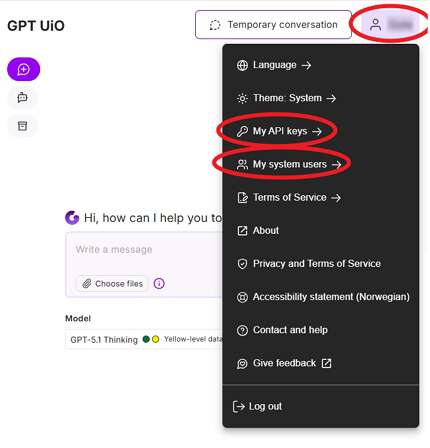
My API keys/My system users
- Log in to gpt.uio.no
- Click on your username at the top right in GPT UiO
- In the menu that appears, click My API keys for a personal API key or My system users for a service API key.
- There are separate keys for models that support up to Yellow data and up to Red data.
- Click Generate new for the key type you need (or skip this if you already have a valid key that you want to continue using)
- Click on the desired model
- Copy out the information for API access, typically Key, Base URL and Model (name).
- Enter this into the tool according to the tool’s documentation.
Using the API access
- If you want to know more about how to use the API access, you can read Getting started with AI using API access.
Call us
Opening hours are weekdays from 08:30 to 17:00 and Saturdays from 10:00 to 15:00.
Phone number: 22 84 00 04
Book a Zoom meeting
Students and employees can book a Zoom meeting with UiO Helpdesk. Available hours are Tuesday to Thursday between 11:00 and 13:00.
Book a video call