Information
Windows settings backup and restore is a feature in Intune that stores users' device settings and Microsoft Store app configurations, making it easier to switch PCs or reinstall.
NOTE: This is only supported on personal machines.
Backup
Backup happens seamlessly and without the user having to do anything at all:
- The scheduled backup task runs automatically every eighth day, backing up user settings, preferences, and the list of installed Microsoft Store apps.
- Alternatively, the user can start a backup manually by searching for the Windows Backup app in the Windows search box and selecting "Back up now".
Restore
The restore process can currently be started during the out-of-box experience (OOBE), when the user signs in with their UiO user account. The following steps show how to restore:
- The user turns on a new or reinstalled device and starts the out-of-box experience (OOBE).
- During OOBE, the user signs in with the same user@uio.no account that was used for the backup.
- After the sign-in screen, the restore page is displayed. The user can choose to restore a backup from a previous device or set up the device as new.
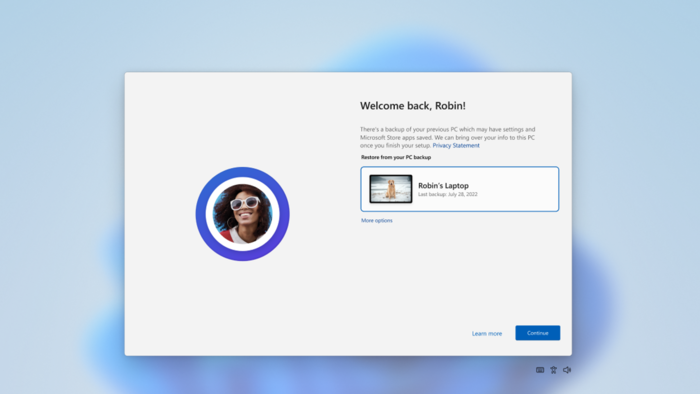
- To restore settings and any Microsoft Store apps from a previous device, the user selects the device and then Continue.
- The remaining enrollment process is the same as the standard setup.
- When enrollment is complete and the user reaches the desktop, all previously backed-up settings and Microsoft Store apps are automatically restored.
User experience
When the feature is enabled, the user can manage backup settings directly in Settings by going to Accounts > Windows backup.
- To turn off backup of preferences, the user can disable the "Remember my preferences" toggle.
- To turn off backup of the list of installed Microsoft Store apps, the user can disable the "Remember my apps" toggle.
Call us
Opening hours are weekdays from 08:30 to 17:00 and Saturdays from 10:00 to 15:00.
Phone number: 22 84 00 04
Book a Zoom meeting
Students and employees can book a Zoom meeting with UiO Helpdesk. Available hours are Tuesday to Thursday between 11:00 and 13:00.
Book a video call