- Go to the website: gpt.uio.no.
- Click on the Log in via Feide button, and if necessary, enter your Feide username and password.
- Read and accept the terms of use.
- If the application is not in English, you can change language from the Your account button and select Language. Then, select English. The your account button is a blue button marked with your name in the top right corner of thw application window.
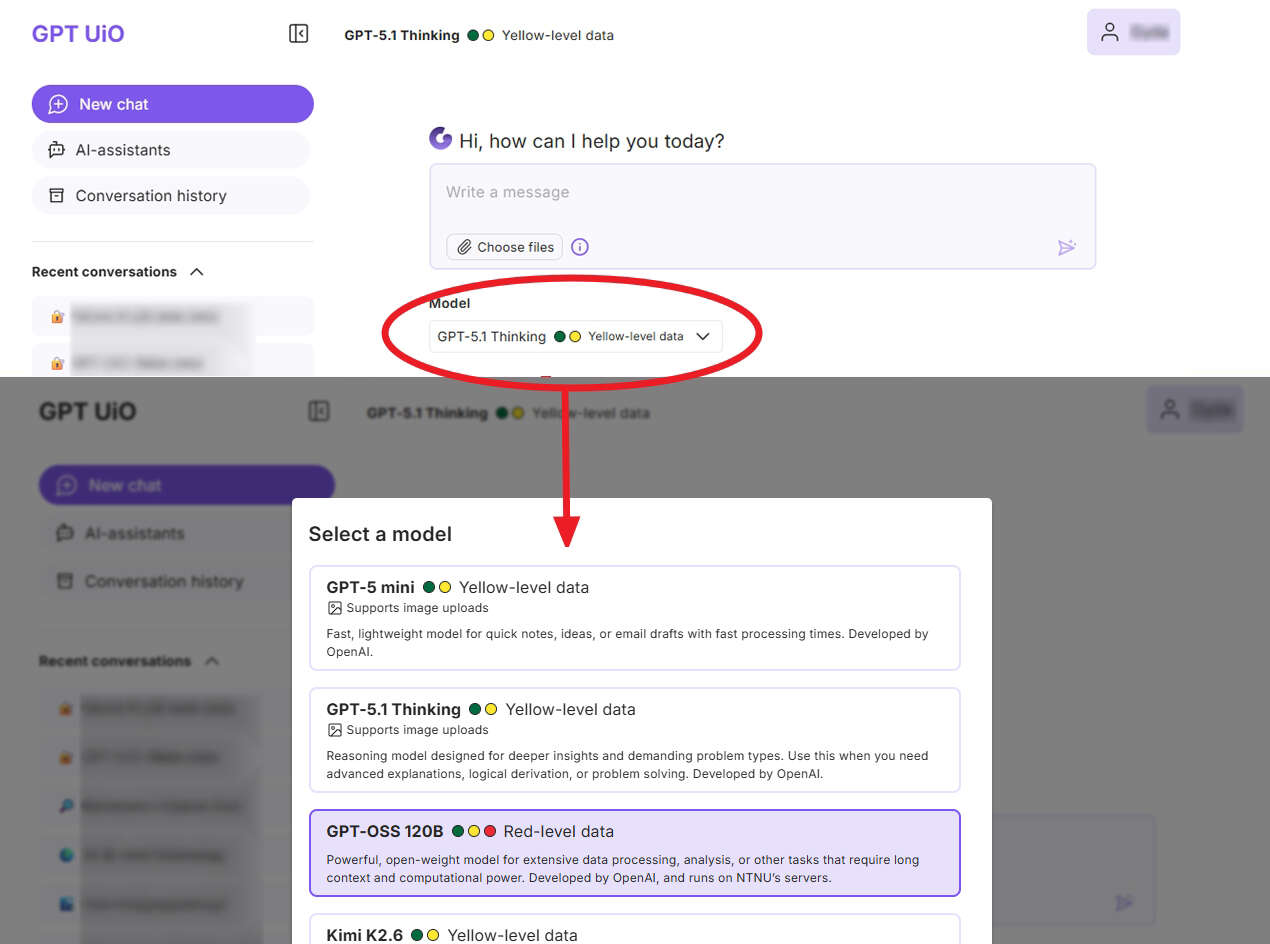
- Before you start the conversation, you can choose a GPT model. You cannot change the model once you have started a conversation. If you want to switch models, you must start a new conversation.
- AI models have different characteristics and use cases, so GPT UiO lets you choose between multiple models. The characteristics are described under each individual model in the list of models when you start a new conversation. Read more about the models in GPT UiO.
- When you start a new conversation, you will see a field where you can enter a question / a prompt or upload a file.
- To generate a response, press ‘Enter’ on the keyboard or click the arrow to the right of the message field.
Some practical tips:
- Every time you start a new topic, you should start a new conversation.
- If you want to switch GPT model, you must start a new conversation.
- You can paste text directly into the conversation window, for example if you want to translate something. Note that there is a maximum length limit for the text.
- If you continue an old conversation, the history in that conversation will be sent along so you can continue where you left off last time.
GPT UiO can now be used with red (confidential) data
UiO GPT can be used as part of teaching at UiO and also for research involving personal data up to yellow data. See guide for data classification.
Together with some of the available AI models, GPT UiO can be used with up to red (confidential) data. Which models this applies to is marked in the service.
When processing personal data, GDPR must be followed as stated in the terms of use and privacy statement. The purpose must be assessed concretely and the legal basis for processing must be assessed specifically in relation to the purpose. If this is unclear, assistance should be sought.
If you are going to use GPT UiO with red data, you must choose a model approved for this.
How to select a model:
Call us
Opening hours are weekdays from 08:30 to 17:00 and Saturdays from 10:00 to 15:00.
Phone number: 22 84 00 04
Book a Zoom meeting
Students and employees can book a Zoom meeting with UiO Helpdesk. Available hours are Tuesday to Thursday between 11:00 and 13:00.
Book a video call