You cannot print webpages directly from a UiO public PC. Webpages must be saved as PDF files before they can be printed.
How to save a webpage as a PDF for printing:
- Go to the website you want to save as a PDF.
- Press Ctrl + P to open the print menu.
- Select Microsoft Print to PDF as your printer.
- You can also choose Save as PDF or Microsoft XPS Document Writer, but UiO recommends Microsoft Print to PDF in this case.
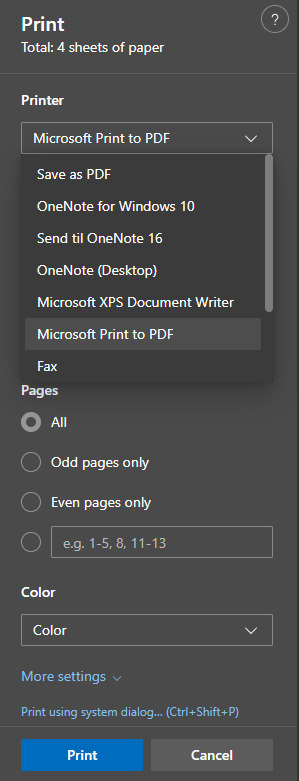
- You can also choose Save as PDF or Microsoft XPS Document Writer, but UiO recommends Microsoft Print to PDF in this case.
- Click on PRINT
- Select save location:
- On public PCs, only the Downloads folder is available.
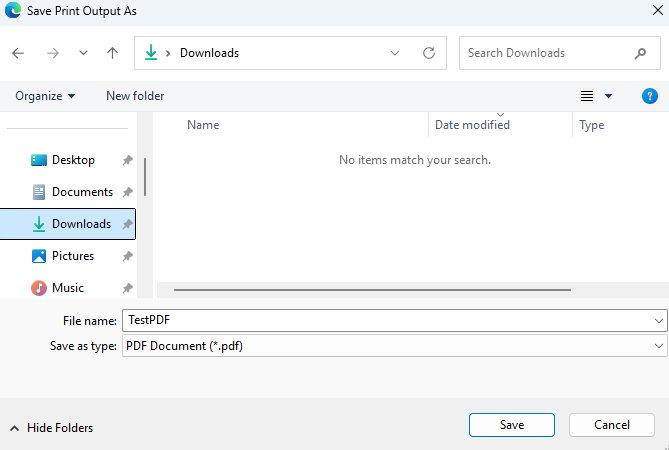
- On public PCs, only the Downloads folder is available.
- Press save
- The PDF is now saved and ready to upload to Webprint for physical printing.
Søk i veiledningene
Did you find what you were looking for?
Kontakt brukerstøtte:
Ring oss
Vi har åpent mellom 08:30 og 17:00 på hverdager,
og mellom 10:00 og 15:00 på lørdager.
Telefonnummer: 22 84 00 04
Send inn sak til oss
Du kan sende inn din forespørsel via e-post til: it-hjelp@uio.no.
Gå til e-postBook et videomøte over Zoom
Er du student eller ansatt kan du avtale veiledningstime hos UiO Helpdesk over Zoom. Tilgjengelige tider er tirsdag til torsdag mellom 11:00 og 13:00.
Book et videomøte