You must always be attentive when working with documents containing confidential information. At UiO, we follow the Storage Guide and Sharing Guide when storing or sharing documents, and it is especially important when dealing with information classified as Red (confidential) in the Classification Guide.
Red information must be labeled
Want to know more?
MS365 is a cloud service where we can store documents in Teams, OneDrive, and SharePoint. Being a cloud service means the data we have there is not stored locally at UiO, but on servers elsewhere. We have an agreement that the data will be stored in Norway, but we must still be extra cautious with red (confidential) data. At UiO, we have experimented with having red data in MS365 on the condition that documents with red data are labeled with a sensitivity label. Now it turns out that the encryption associated with the label we tried out cannot be used on documents intended for archiving. Therefore, two new labels are now introduced for marking red information in MS365.
Documents with red information MUST be labeled if stored or shared in Teams, OneDrive, SharePoint, or any other MS365 application.
The option to process red (confidential) information in MS365 applies to administrative data. Red research and teaching data should, as a general rule, NOT be handled in MS365.
The new labels
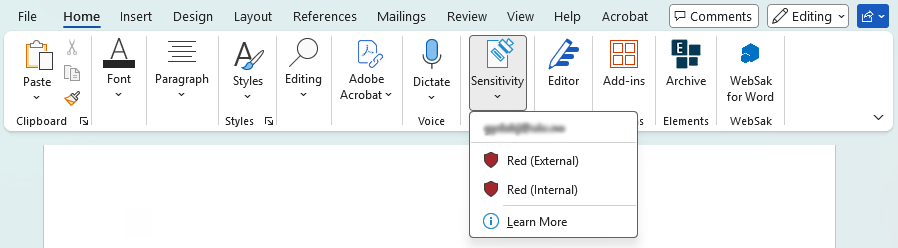
The new labels are called Red (Internal) and Red (External). Both protect the documents they are applied to. The difference is that documents with the Red (Internal) label cannot be shared with users outside UiO. It is not often we need to share red information outside UiO, but when necessary the Red (External) label can be used. If you are to share red information with people outside UiO, it is recommended that you, in addition to applying the Red (External) label, also set an expiration date for the sharing. Who can read documents with a label is determined when you set permissions in the sharing dialog (as for other documents you share in MS365).
Change label on old documents
If you have used the old label Red (in confidence) on documents, it is recommended that you change the label to one of the new labels. If documents with the old label are no longer important, it is recommended that you delete them. You will still be able to read documents with the old label, but you cannot apply it to new documents.
Do not send red information by email
During the trial of labels we have conducted, it has been permitted to send emails with red information in the email text itself provided the email was labeled. This will no longer be allowed, and the label used for email will be removed. If you have emails with the Red (in confidence e-mail) label, you will still be able to read them, but you cannot apply the label to new emails. If you want to share red information, you must have the information in a document which you label and then share the link to.