Note: WebPrint is only available from the UiO network, such as EduRoam or wired network.
The file name of the documents you upload cannot contain the following characters:
\ / : * ? " < > |
Printing with Web Print:
- Go to → print.uio.no in your browser.
- Enter your username and password and click Log in.

- Select Web Print
- Select Web Print from the left-side menu.

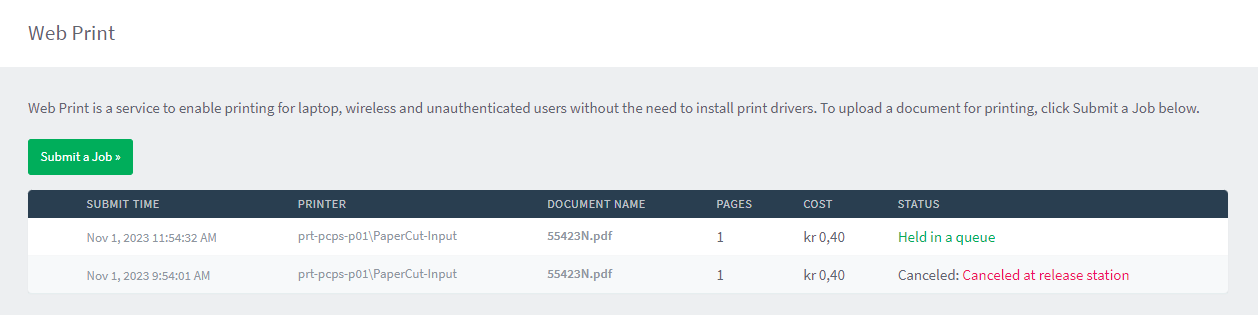
- Submit a print job
- Click on Submit a job.

- Select number of copies
- If desired, specify the number of copies you want to print.
- Then click Upload Documents.
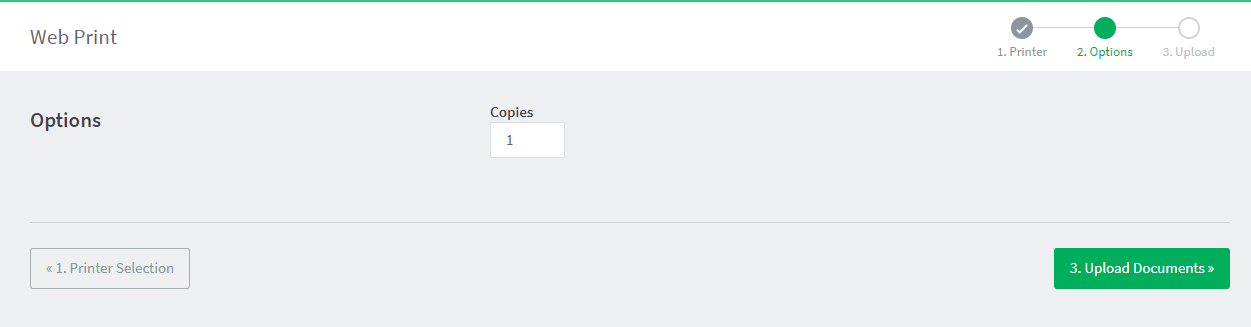
- Upload documents for printing
- Upload the document(s) you want to print by selecting Upload from computer.
- Once you have uploaded what you want to print, select Upload & Complete.

- Retrieve your print
- When the STATUS shows Held in a queue, the document is uploaded and ready to be printed.
- Go to the printer you want to print from and either present your card or log in with your username and password to retrieve your print.
Søk i veiledningene
Did you find what you were looking for?
Kontakt brukerstøtte:
Ring oss
Vi har åpent mellom 08:30 og 17:00 på hverdager,
og mellom 10:00 og 15:00 på lørdager.
Telefonnummer: 22 84 00 04
Send inn sak til oss
Du kan sende inn din forespørsel via e-post til: it-hjelp@uio.no.
Gå til e-postBook et videomøte over Zoom
Er du student eller ansatt kan du avtale veiledningstime hos UiO Helpdesk over Zoom. Tilgjengelige tider er tirsdag til torsdag mellom 11:00 og 13:00.
Book et videomøte