About dynamic forms
- When you build a form, it is possible to show individual questions based on previous answers from the respondent. This can be useful when some questions are not equally relevant for all respondents.
- You can add dynamic display to individual questions of the types Single choice and Multiple choice.
- The answer that determines whether a new question is shown or not must appear higher up in the form than the element that will be displayed dynamically.
- Mandatory questions can have conditional display – they are not required when they are not shown.
A question can only be controlled by one parent question.
How to set up a dynamic form
- Create a question in your nettskjema form (question 1). The question can be either of the type Single choice or Multiple choice.
- Create the question you want to be shown if the respondent gives a specific answer to question 1. This element must be below the question, and can be of any question type.
Click on Settings (the cogwheel) for the element you created. Under Show only if, click on question 1. Then tick the answer the respondent must select for this element to appear for the respondent.
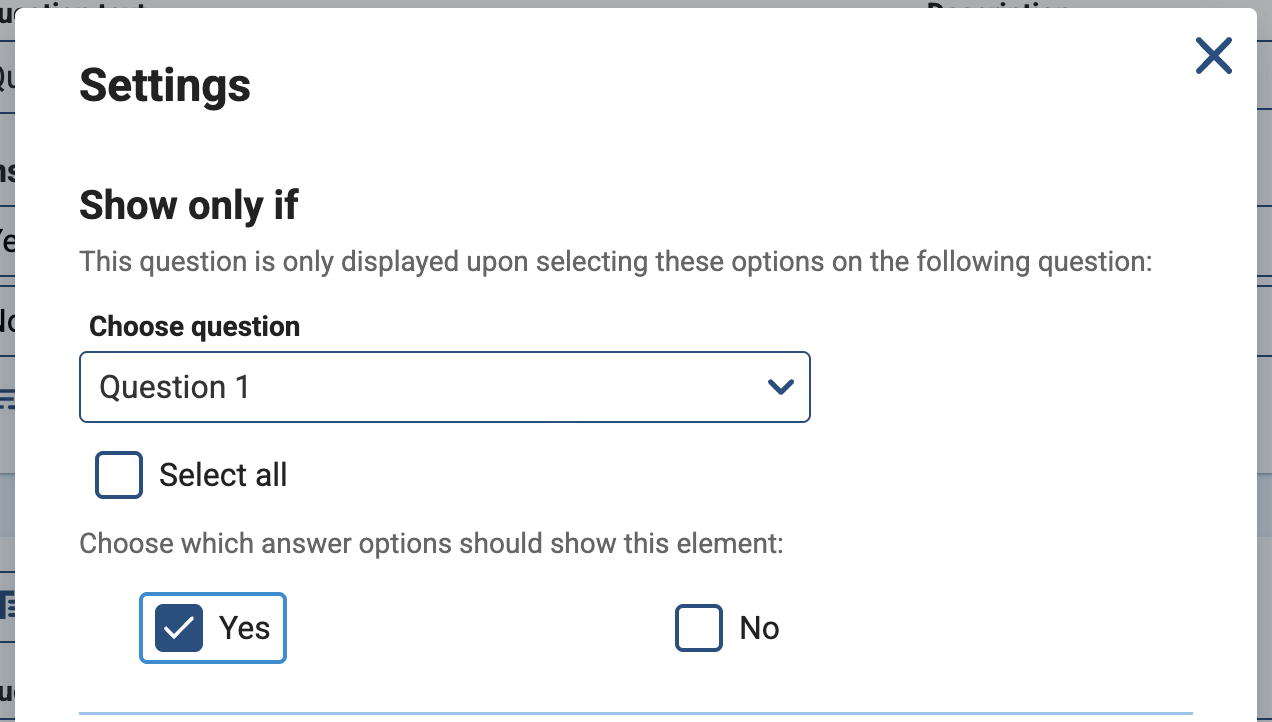
- Then click Save. This element will now only be shown when the respondent gives the answer you selected for question 1.
Example of a dynamic form
This example shows how to set up a dynamic form where we want an overview of allergens for respondents. The first question asks respondents whether they have an allergen, while the next question is only shown if they answer yes to the first question.
- First, create a question of the type Single choice. The question is “Do you have any allergies?”, and the respondent can answer either “Yes” or “No”.

Then create a new question (question 2) of the type Text answer. In the question text, write “What allergies do you have?”

Go to Settings (the cogwheel) for question 2. Here you select the question Do you have any allergies? under Show only if. Then tick Yes under Select which answers should show this element.

- Then click Save. Only those who answer yes to having an allergy will then get the question about which allergen they have.
Call us
Opening hours are weekdays from 08:30 to 17:00 and Saturdays from 10:00 to 15:00.
Phone number: 22 84 00 04
Book a Zoom meeting
Students and employees can book a Zoom meeting with UiO Helpdesk. Available hours are Tuesday to Thursday between 11:00 and 13:00.
Book a video call