How to create a short name
Go to the Collect responses tab

Click the button for changing the URL of the form
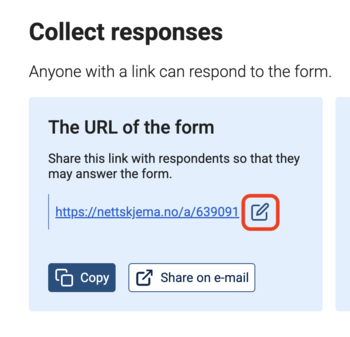
Enter a suitable name in the field and click Save

Copy new address, and use only this one when communicating with respondents.
More about using a short web address
When the form setting Who can respond to the form is set to Invited only – invitation by email/SMS, it is not possible to use a short name. This is because the Nettskjema service sends invitations where the respondent receives a personal, unique invitation link that does not use the form’s address.
The original address with ID will still work together with the short name, but should not be used. Short names must be unique within the Nettskjema service.
Forms that store data in TSD/Educloud
Forms connected to a TSD form are locked against changes to layout and codebook once they start receiving data. If an active TSD form needs to be changed, this may damage the form’s data model on the TSD side and put the project’s data quality at risk.
For changes to a TSD form that affect the data model, you must:
- create a copy of the active form,
- make the changes to the copy,
- activate the copy towards TSD.
If, in such a case, there is a custom address defined for the form, it can be replaced without having to notify respondents or carry out any other notification than possible internal process logging.
Call us
Opening hours are weekdays from 08:30 to 17:00 and Saturdays from 10:00 to 15:00.
Phone number: 22 84 00 04
Book a Zoom meeting
Students and employees can book a Zoom meeting with UiO Helpdesk. Available hours are Tuesday to Thursday between 11:00 and 13:00.
Book a video call