About Person ID
Person ID is a field that can collect multiple types of identification, such as birth number, bank account, passport or case number. Values collected in this field type are never sent in an email.
The format in the field can be set to require that the content:
- comply with requirements for a formal Norwegian personal identification number
- is a block of digits
- matches a number of letters and/or digits
In addition, you can require that the field is:
- mandatory to fill inn
- and/or that what is written is repeated once. Only one value is stored in the response.
The contents of the field will be cleared if the form is defined as old. Read more about clearing personal data in Nettskjema.
How to set up Person ID
You can create a new form or edit an existing form in the Form builder.
Create a new form which contains Person ID
Click Create form on the home page in Nettskjema. Click Yes under Would you like to collect respondent information?
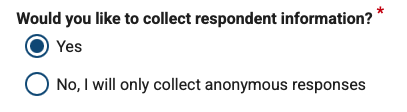
Select Person ID under Which personal information should be stored?

- Create the form. In the Form Builder for the form, a field for Person ID will be added where you can choose between Norwegian national identity number, only numbers, and custom personal ID. See the instructions below for each option.
Adding a person ID to an existing form
- Go to Form builder on the form you want to add the person ID to, and press add new.
On the new question, select Person ID, under Personal data. Note that you can only select Person ID if you have selected Yes for the form to collect personal information. You can change this in the form settings.

- Once you have added your person ID to the form builder, you will be able to choose between Norwegian national identity number, only numbers, and custom personal ID. See the instructions below for each option.
Person ID with Norwegian national identity number
If you will be collecting National ID numbers you must have the legal right to collect personal information ref. The Act relating to the processing of personal data § 12. You are responsible for determining whether you have a legal right for the use of National ID numbers, and whether you have a particular need for identification the person using the National ID number and that no other identifiers that can be used.
The special field Person ID with the format Norwegian birth number allows for validation of Norwegian birth numbers with 11 digits so that any typing errors are caught. Common Norwegian birth numbers, D numbers and H numbers are supported, but not currently so-called FH numbers.
Validation is selected as the default format when creating a form with a Personal ID field. When using a personal ID number as the format, it is not necessary to check the box for Repeat personal ID. Norwegian personal ID numbers are validated without adding additional control mechanisms.
If a copy of the response is sent by email, the response value from the Personal ID field will be replaced with the text "Cannot display", regardless of what adjustments you have made to the field.
Person ID with only numbers
It is possible to choose that a person ID should contain only numbers, for example, for national ID numbers from other countries or other ID that consists of only numbers. Select Repeat person ID in this field as a double check that the ID is entered correctly.
Custom Person ID
If you select Custom, you can select a given number of letters and/or numbers. Uppercase and lowercase letters are distinguished, but it is not possible to define the order. Characters other than numbers and letters will not be accepted in the field.
If you only need a given number of letters, enter the number of digits. If the ID consists of 2 letters and 4 numbers, enter this under the number of letters and digits. Note that the order of the letters and numbers is not checked.
If there is a more specific need for validation of a study ID, and the project has a defined logic in the ID that it is desired to use, this can be entered by developers in Nettskjema.
Related content
Call us
Opening hours are weekdays from 08:30 to 17:00 and Saturdays from 10:00 to 15:00.
Phone number: 22 84 00 04
Book a Zoom meeting
Students and employees can book a Zoom meeting with UiO Helpdesk. Available hours are Tuesday to Thursday between 11:00 and 13:00.
Book a video call